Introduction
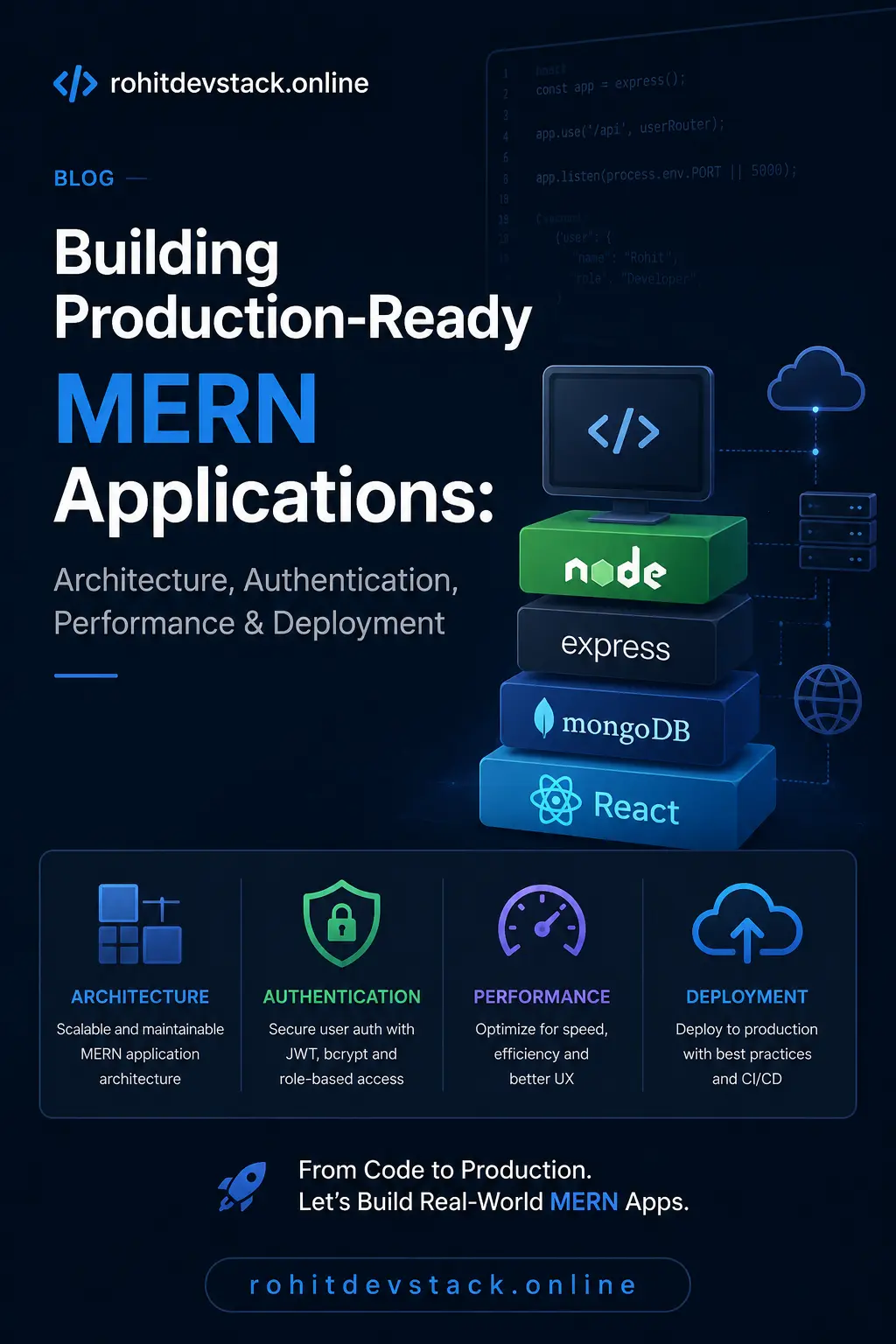
The MERN stack has become one of the most popular technology stacks for building modern web applications because it combines JavaScript across the entire development process. Developers can build responsive user interfaces with React or Next.js, create scalable APIs using Express and Node.js, and store flexible data structures inside MongoDB. This unified JavaScript ecosystem significantly reduces context switching and improves developer productivity, making MERN an excellent choice for startups, SaaS products, enterprise dashboards, and real-time applications.
However, building a project that works on your local machine is very different from building software that thousands of users rely on every day. Production-ready applications require careful planning, secure authentication, maintainable architecture, optimized database queries, proper error handling, monitoring, caching, deployment automation, and continuous improvements. Ignoring these aspects often results in applications that become difficult to maintain as they grow.
In this guide, you'll learn the principles and best practices behind building scalable MERN applications that can grow with your business. We'll explore project architecture, authentication using JWT, MongoDB schema design, Express API organization, performance optimization, deployment, and common mistakes developers should avoid. Whether you're creating your first SaaS application or improving an existing project, these concepts will help you build software that performs reliably in production.
“Writing code is only the beginning. Building software that remains reliable, secure, and maintainable for years is what defines a great developer.”
Why the MERN Stack Is So Popular
One of the biggest reasons behind MERN's popularity is the consistency of using JavaScript across the frontend, backend, and database interactions. Instead of switching between multiple programming languages, developers can focus on solving business problems using a single ecosystem. This improves collaboration, simplifies onboarding, and allows code sharing between frontend and backend where appropriate.
React provides a component-based architecture that makes building reusable interfaces straightforward. Next.js extends React by introducing server-side rendering, static site generation, file-based routing, image optimization, and powerful SEO capabilities. On the backend, Express simplifies API development while Node.js offers excellent performance for asynchronous operations. MongoDB stores flexible JSON-like documents, making it an ideal database for rapidly evolving products.
Planning Your Project Before Writing Code
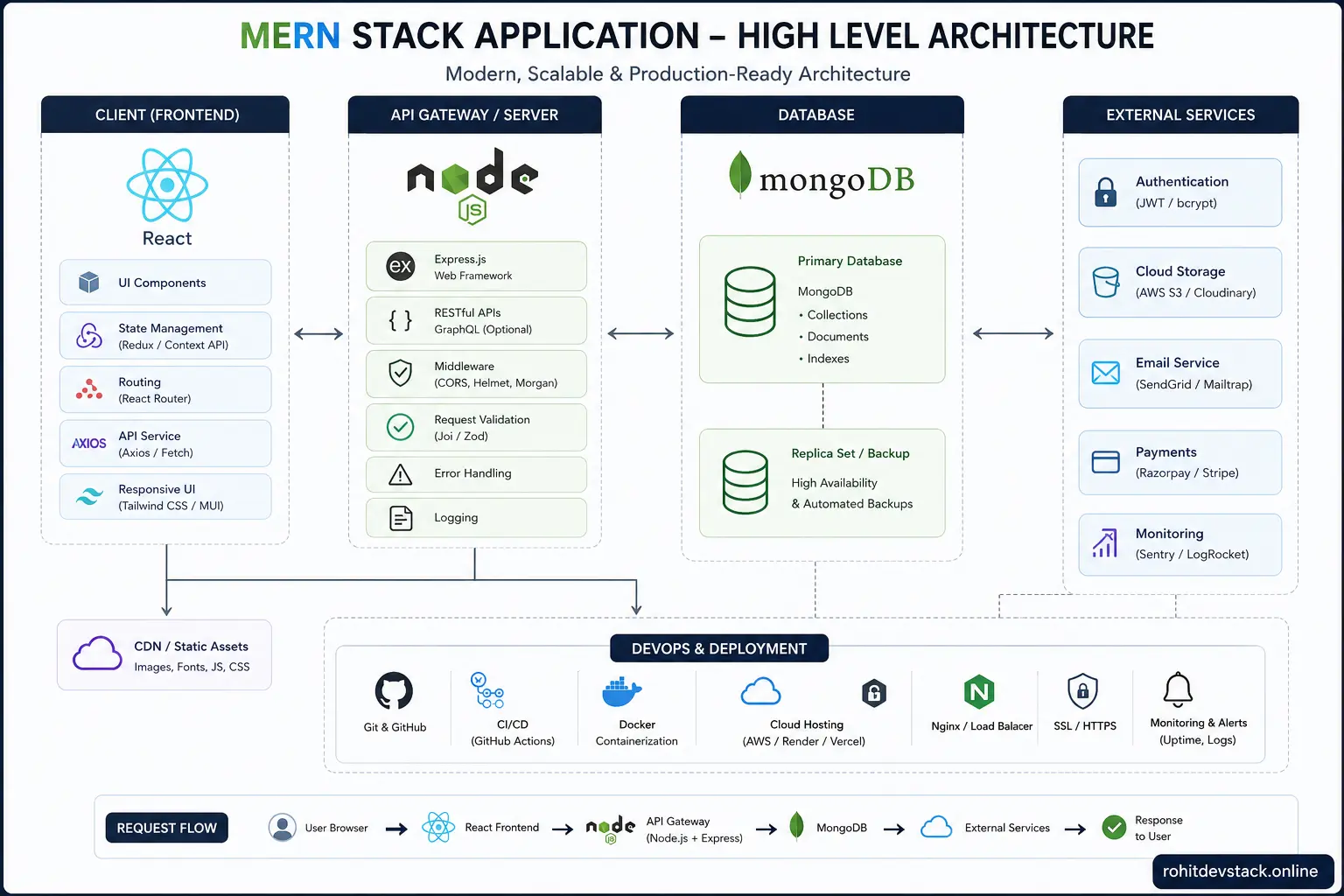
One of the most common mistakes developers make is starting implementation before understanding the product requirements. Professional software development begins with planning. Define your application's primary goals, identify different user roles, list required features, and create user flows before writing any code. This planning phase helps prevent unnecessary rewrites and keeps the architecture organized as the project expands.
Breaking your application into independent modules also improves maintainability. Authentication, user management, notifications, payments, analytics, and administration should each have clear responsibilities. A modular architecture allows teams to develop and test features independently while reducing coupling between different parts of the system.
Professional Development Tip
Spend time designing your folder structure, API contracts, database models, and authentication flow before writing business logic. Good planning often saves weeks of refactoring later in the project.
Designing a Scalable Project Structure
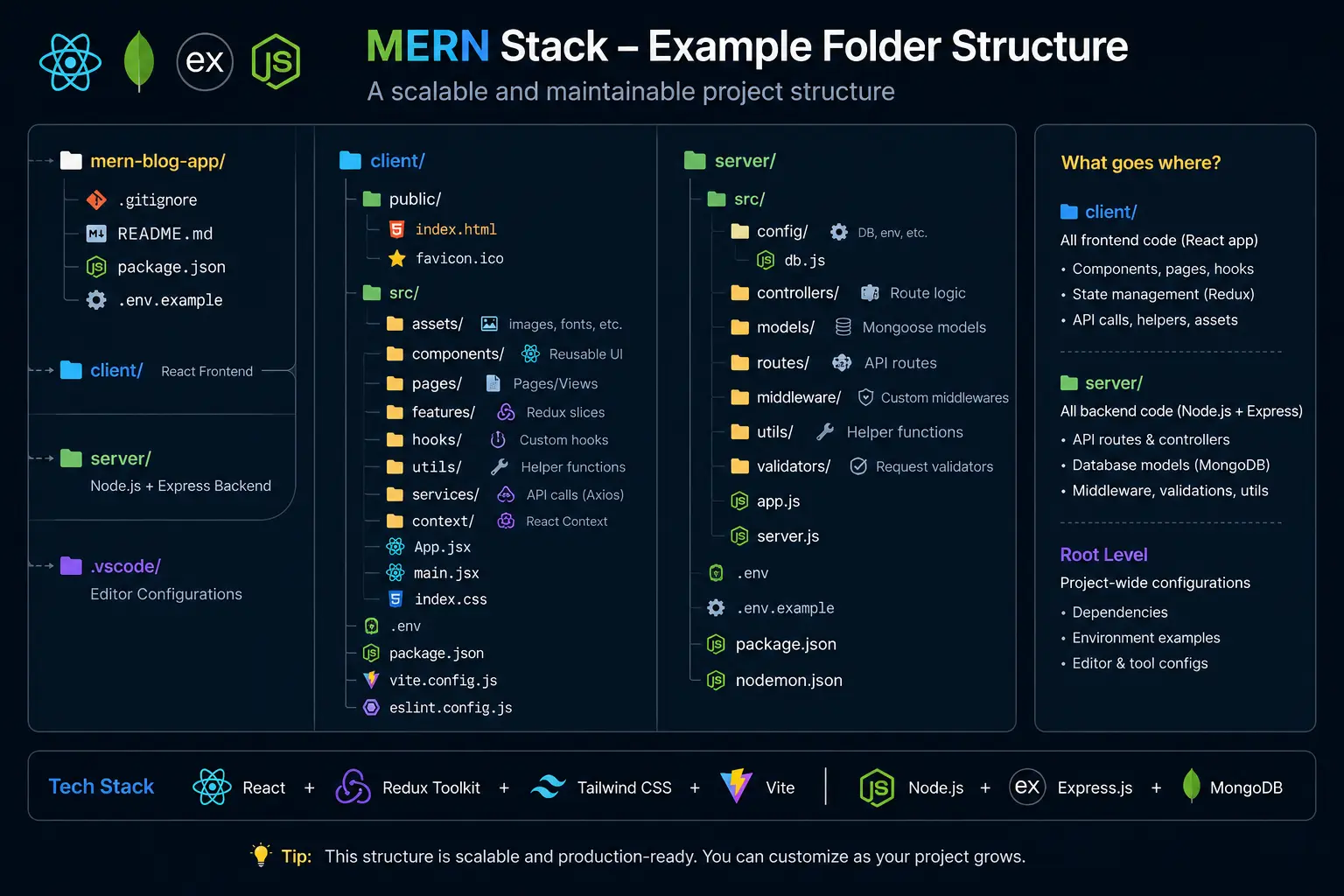
A well-organized folder structure is one of the biggest differences between beginner and professional MERN projects. As applications grow, hundreds of files are added across the frontend and backend. Without a clear architecture, developers spend more time searching for code than writing it. Organizing your project into logical modules keeps responsibilities separated and makes the codebase easier to maintain, test, and scale.
On the frontend, group files by features instead of file types whenever possible. Keep components, hooks, API services, validation schemas, and page-specific utilities close to the feature they belong to. On the backend, separate routes, controllers, services, middleware, models, utilities, and configuration. This approach reduces coupling between modules and makes future development much easier.
Authentication Architecture
Authentication is one of the most critical parts of any production application. A weak authentication system can expose user accounts, compromise sensitive information, and damage trust. Instead of only focusing on logging users in, developers should design authentication as a complete security layer that includes registration, login, token management, authorization, password recovery, session management, and account protection.
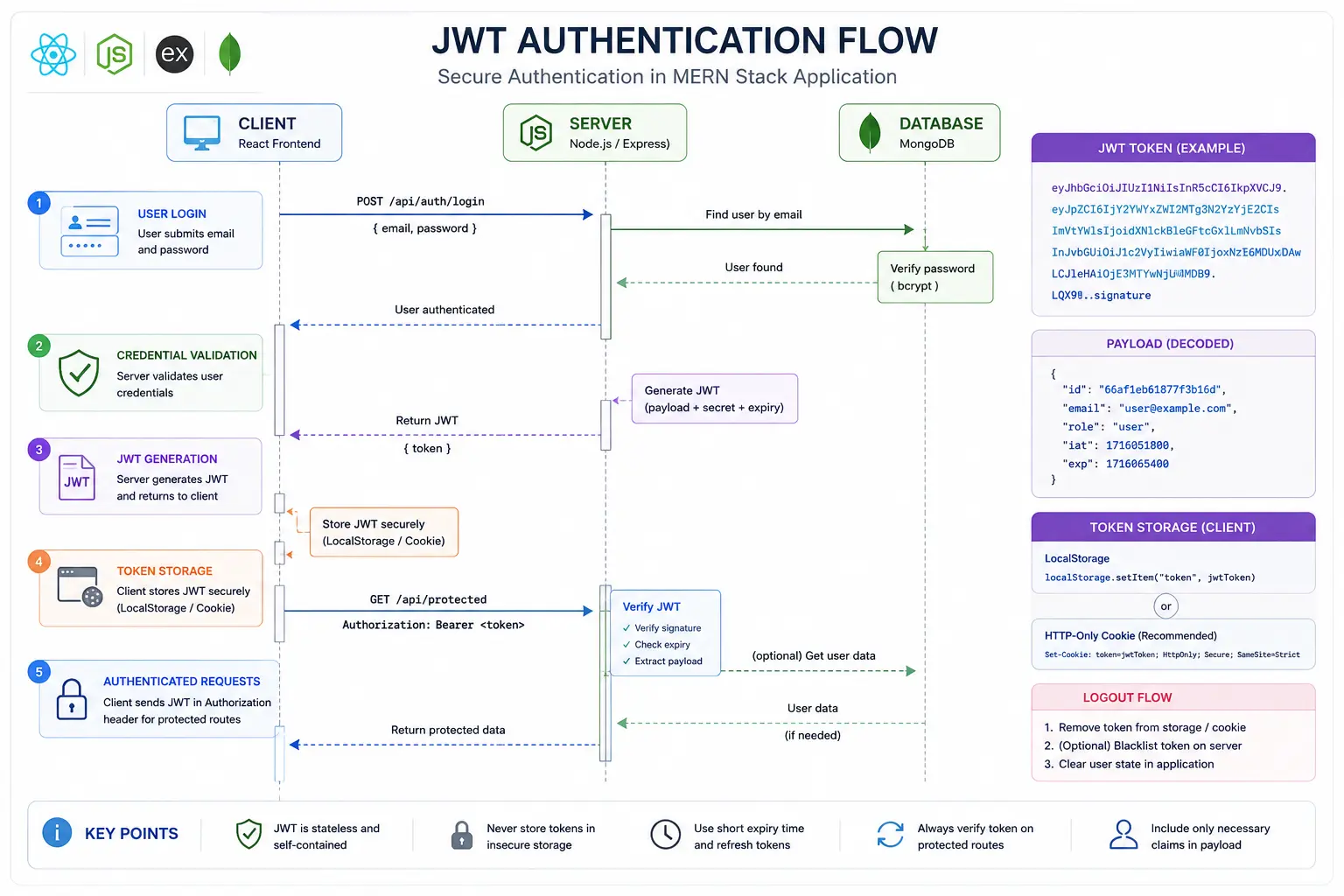
JWT authentication remains one of the most popular approaches for REST APIs. After successful login, the server generates an access token with a short expiration time and a refresh token with a longer lifetime. The access token is used to authenticate API requests, while the refresh token is securely stored and used to generate new access tokens without forcing users to log in repeatedly.
Security Best Practice
Never store refresh tokens inside localStorage. Store them in secure httpOnly cookies to reduce the risk of token theft through cross-site scripting attacks.
Implementing JWT Authentication
JSON Web Tokens provide a secure and stateless way of authenticating users. Each token contains encoded information such as the user's identifier and expiration time. Every protected API request includes the access token, allowing the server to verify the user's identity without storing session data in memory.
Although JWT simplifies authentication, it should never contain sensitive information such as passwords or confidential business data. Tokens should include only the minimum information necessary to identify the user. Always sign tokens using strong secret keys stored in environment variables rather than hardcoding them inside the application.
import jwt from "jsonwebtoken";

export const generateAccessToken = (user) => {
  return jwt.sign(
    {
      id: user._id,
      role: user.role,
    },
    process.env.ACCESS_TOKEN_SECRET,
    {
      expiresIn: "15m",
    }
  );
};
The example above generates a short-lived access token containing only the user's identifier and role. Keeping the payload small improves security and reduces token size, making every authenticated request more efficient.
Using Refresh Tokens Correctly
Access tokens should expire quickly to minimize damage if they are compromised. Refresh tokens solve the usability problem by allowing users to obtain new access tokens without signing in again. When the access token expires, the client silently requests a new one using the refresh token stored inside an httpOnly cookie.
A secure refresh token strategy also includes token rotation. Every time a refresh token is used, generate a completely new refresh token and invalidate the previous one. This reduces the risk of replay attacks and improves the overall security of your authentication system.
Protecting API Routes
Every protected API endpoint should verify the access token before executing business logic. Authentication middleware keeps this logic centralized instead of repeating it inside every controller. Middleware verifies the token, loads the authenticated user, and attaches that information to the request object for later use.
export const verifyJWT =
         async (req, res, next) => {
  const token = req.cookies.accessToken;

  if (!token) {
    return res.status(401).json({
      message: "Unauthorized",
    });
  }

  const decoded = jwt.verify(
    token,
    process.env.ACCESS_TOKEN_SECRET
  );

  req.user = decoded;

  next();
};
Centralizing authentication inside middleware improves code quality and reduces duplication. Every protected route benefits from the same security checks, making future maintenance much simpler.
Authorization and User Roles
Authentication verifies who a user is, while authorization determines what that user is allowed to do. These two concepts should never be confused. After authenticating a user, the application should evaluate permissions before allowing access to protected resources such as administrative dashboards, financial information, or management tools.
A role-based access control system keeps authorization manageable. For example, an academy management platform may define administrator, teacher, and student roles. Middleware can verify these permissions before executing controllers, ensuring that users only access the resources they are authorized to manage.
Common Mistake
Never rely on frontend validation for authorization. Every permission check must also be enforced on the backend because frontend code can be modified or bypassed.
Designing an Efficient MongoDB Database
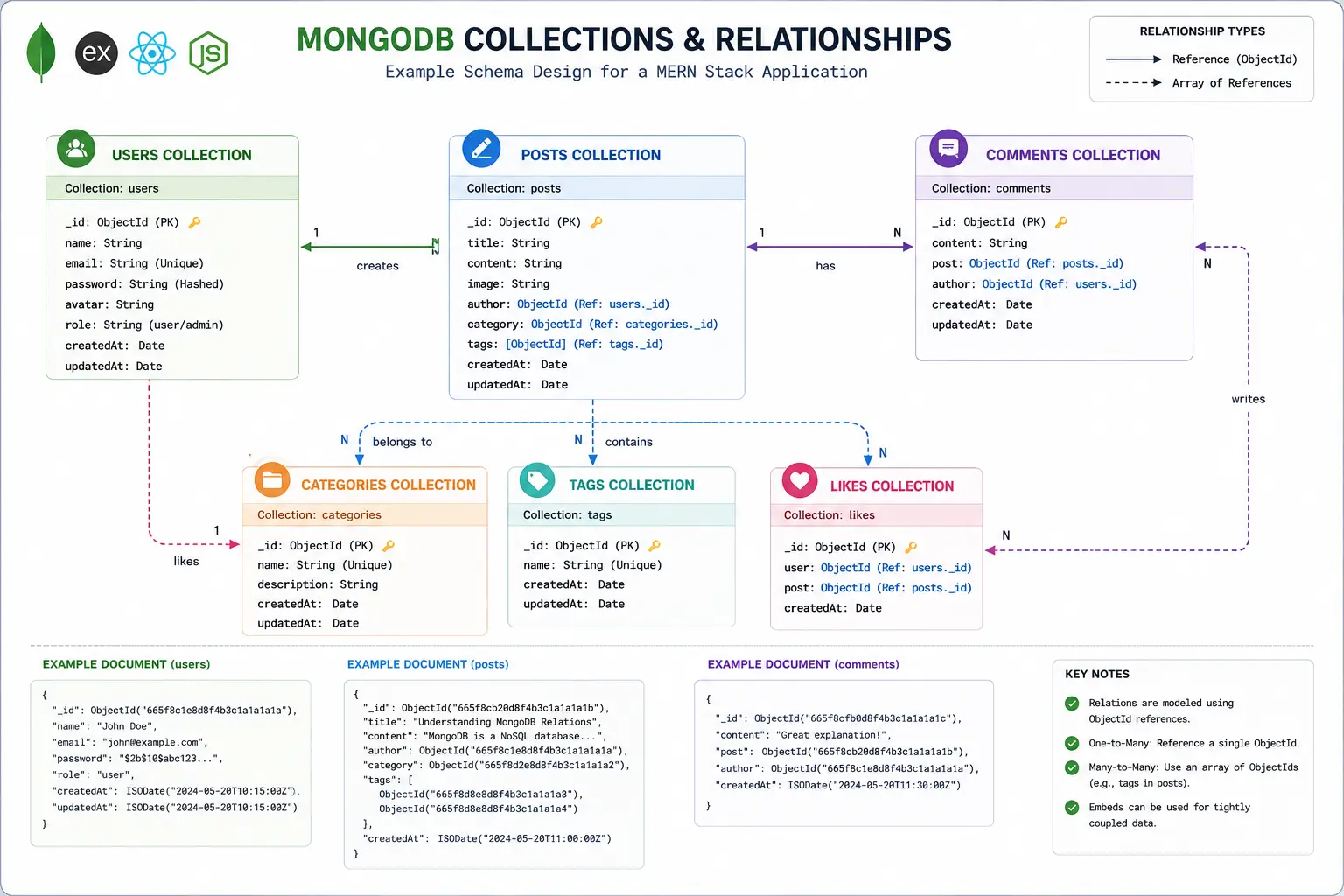
A database should be designed around the application's access patterns rather than simply storing data. Before creating collections, think about the information users will request most frequently, the relationships between documents, and how your queries will scale as the application grows. A thoughtful schema design reduces unnecessary database operations and improves response times.
MongoDB's document model provides excellent flexibility, but flexibility should not become an excuse for inconsistent data. Define clear schemas with Mongoose, validate incoming data, create indexes for frequently queried fields, and avoid storing duplicate information unless it provides a measurable performance benefit. Consistency and predictability are just as important as flexibility in production systems.
Writing Maintainable REST APIs
An API should be simple, predictable, and consistent. Use meaningful endpoint names, return appropriate HTTP status codes, and keep request and response formats uniform across the application. Following REST conventions makes your APIs easier to understand for both frontend developers and third-party consumers.
Business logic should live inside controllers or service layers instead of route files. Routes should only define endpoints and delegate work to controllers. This separation of concerns improves readability, simplifies testing, and allows the application to evolve without creating tightly coupled code.
router.get(
  "/students",
  verifyJWT,
  getAllStudents
);

router.post(
  "/students",
  verifyJWT,
  createStudent
);
Input Validation
Every piece of data entering your application should be treated as untrusted. Input validation protects your APIs from malformed requests, prevents unexpected application behavior, and reduces security vulnerabilities. Never assume the frontend has already validated user input because requests can be modified before reaching the server.
Libraries such as Zod, Express Validator, or Joi make validation straightforward. Validate email addresses, phone numbers, passwords, query parameters, uploaded files, and request bodies before processing business logic. Returning clear validation errors also improves the overall developer and user experience.
Validation Rule
Validate every request at the API boundary. Invalid data should never reach your database layer.
Centralized Error Handling
As applications grow, scattered try-catch blocks become difficult to maintain. Instead, create a centralized error handling middleware responsible for formatting errors consistently across every API response. This approach keeps controllers clean while ensuring clients always receive predictable error structures.
Production applications should also distinguish between expected operational errors and unexpected programming errors. Logging unexpected failures helps identify bugs quickly while returning safe error messages prevents exposing sensitive implementation details to users.
app.use((err, req, res, next) =>
           {
  return res.status(err.status || 500).json({
    success: false,
    message: err.message,
  });
});
Performance Optimization
Performance should be considered throughout the development lifecycle rather than as a final optimization step. Even small improvements in response time can significantly improve user experience and search engine rankings. Fast applications retain users longer and reduce server costs.
Optimize database queries by selecting only required fields, creating indexes, using pagination for large datasets, and avoiding unnecessary population of related documents. On the frontend, implement lazy loading, code splitting, image optimization, and caching to reduce loading times and improve Core Web Vitals.
Performance Checklist
Use pagination, indexing, compression, caching, lazy loading, optimized images, and CDN delivery to improve overall application performance.
Caching Strategies
Not every request should reach the database. Frequently accessed data such as dashboards, public content, and analytics can often be cached to reduce database load. Redis is a popular solution for caching sessions, API responses, and frequently requested resources in production environments.
Caching should be applied selectively. Dynamic or user-specific data often requires shorter cache durations, while static resources can be cached for much longer periods. A balanced caching strategy improves performance without compromising data freshness.
Logging and Monitoring
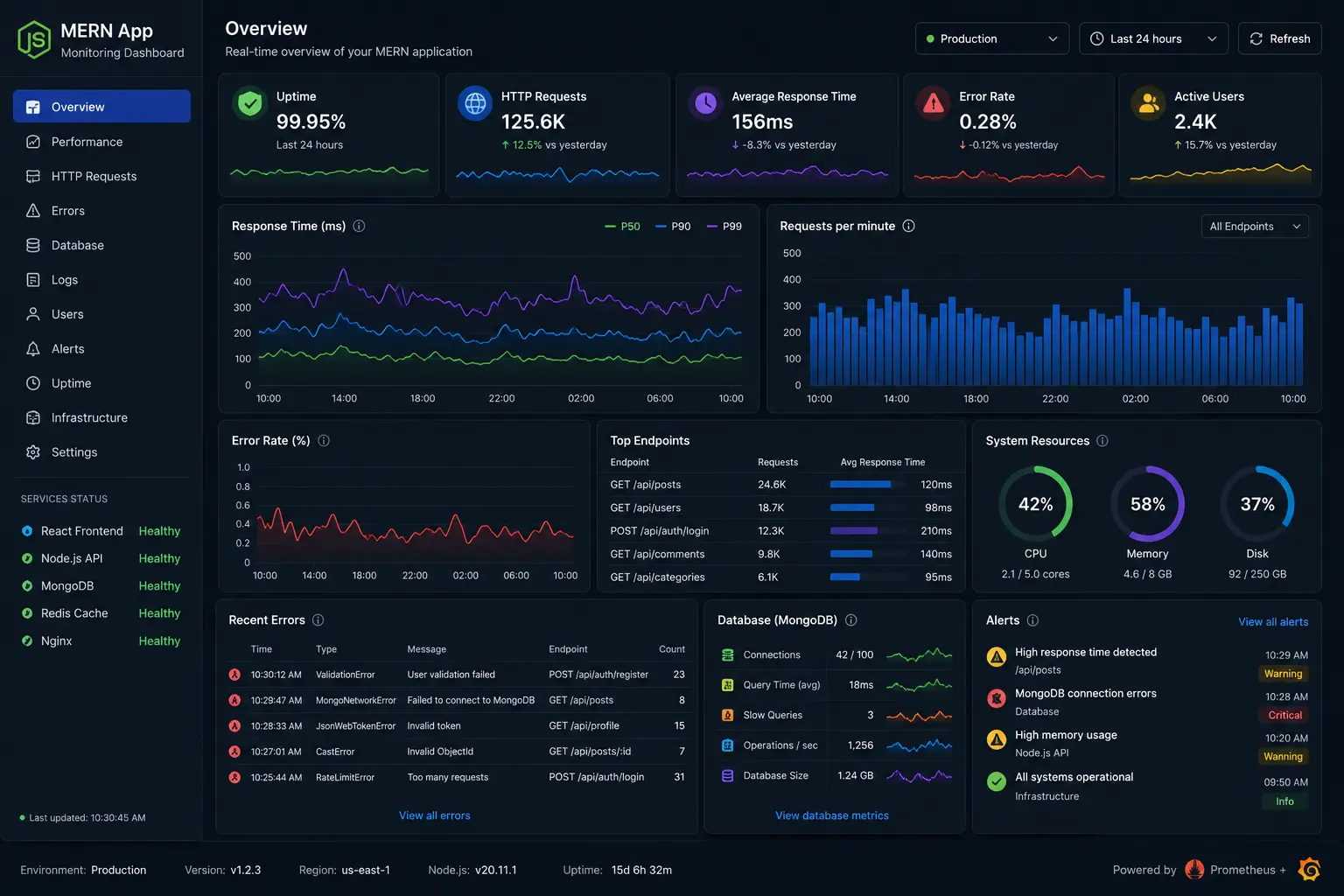
Deploying an application is only the beginning. Production systems require continuous monitoring to detect issues before users report them. Logging API requests, authentication failures, server errors, and performance metrics provides valuable insights into application health.
Monitoring tools help identify slow endpoints, memory leaks, failed deployments, and unusual traffic patterns. Combined with structured logs, they enable developers to diagnose problems quickly and maintain a reliable user experience.
Deploying Your MERN Application
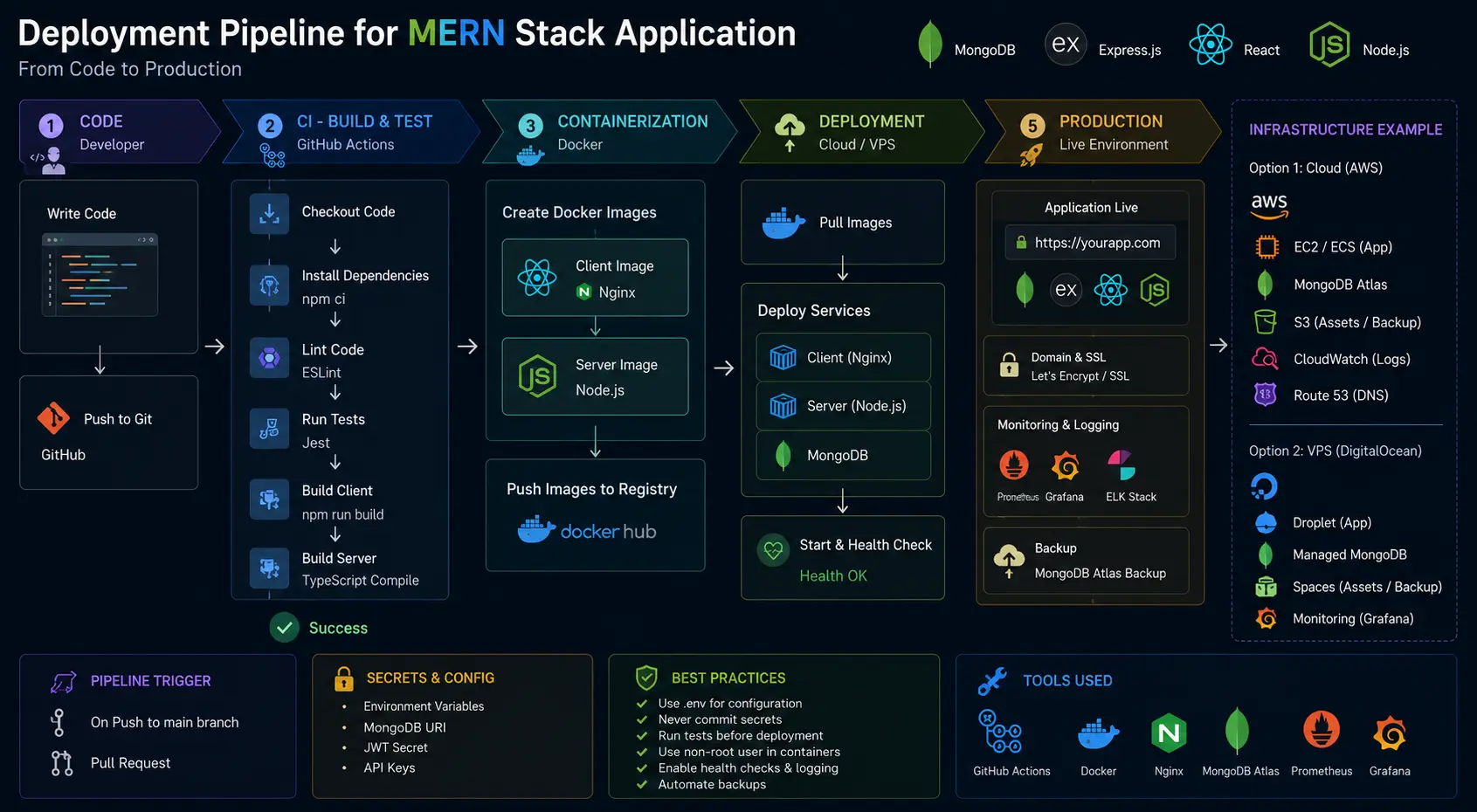
Deploying a production application involves much more than pushing code to a server. A reliable deployment process includes environment-specific configuration, secure secrets management, automated builds, health checks, logging, backups, and rollback strategies. Whether you deploy to Vercel, Render, Railway, DigitalOcean, AWS, or another cloud provider, your deployment pipeline should be predictable and repeatable so every release is consistent.
Store sensitive values such as database connection strings, JWT secrets, API keys, and third-party credentials inside environment variables rather than committing them to version control. Protect production databases with regular backups, monitor server resources, and enable HTTPS to encrypt communication between clients and servers. A secure deployment process is just as important as writing secure code.
Continuous Integration and Continuous Deployment
As projects grow, manually deploying every update becomes inefficient and error-prone. Continuous Integration (CI) automatically validates code changes by running tests, linting, and builds before they are merged. Continuous Deployment (CD) extends this process by automatically releasing verified changes to staging or production environments. Automation reduces human error and increases confidence in every deployment.
Even if you're working alone, setting up a simple CI/CD pipeline saves time over the long term. Automated quality checks help maintain coding standards and catch issues before they affect users.
Deployment Tip
Never deploy directly to production without first testing your application in a staging environment that closely matches your production setup.
Scaling Your Application
Applications that succeed often experience rapid growth in users, data, and traffic. Planning for scalability early helps avoid expensive architectural changes later. Horizontal scaling, database indexing, caching, background job processing, and load balancing are common techniques for supporting increased demand without sacrificing performance.
Real-time features such as chat systems, notifications, and collaborative editing require additional planning. Technologies like WebSockets, Redis pub/sub, and message queues help distribute events across multiple servers, ensuring consistent behavior even as infrastructure expands.
Common Mistakes Developers Should Avoid
Many MERN applications become difficult to maintain because developers focus only on delivering features while ignoring architecture. Large controller files, duplicated business logic, missing validation, inconsistent API responses, and poor database design gradually increase technical debt. These issues may not be noticeable in small projects, but they quickly become obstacles as the codebase grows.
Another common mistake is neglecting performance and security until the final stages of development. Production-quality software should be designed with scalability, monitoring, testing, and security in mind from the beginning rather than added as an afterthought.
Avoid These Pitfalls
Do not hardcode secrets, skip validation, trust client-side permissions, ignore database indexes, or deploy without monitoring and backups.
Production Readiness Checklist
Before launching your application, review a comprehensive checklist. Verify that authentication and authorization are functioning correctly, passwords are securely hashed, environment variables are configured, database indexes are created, logging is enabled, backups are scheduled, rate limiting is implemented, and error handling is consistent throughout the application. These small details collectively determine the reliability of your software in production.
Additionally, test your application on different devices and browsers, measure Core Web Vitals, optimize images, compress assets, and ensure accessibility standards are met. A polished user experience is often the difference between an application that users remember and one they quickly abandon.
“The goal isn't simply to launch an application. The goal is to build software that remains secure, maintainable, and enjoyable to use as it grows.”
Conclusion
Building a production-ready MERN application requires much more than learning React, Node.js, Express, and MongoDB individually. Success comes from combining solid architecture, thoughtful database design, secure authentication, maintainable APIs, performance optimization, monitoring, and reliable deployment practices into a cohesive development process. Every decision—from folder structure to caching strategy—contributes to the long-term quality of the application.
As you continue building projects, focus on writing clean, maintainable code rather than only shipping features. Invest time in understanding software architecture, security, testing, and scalability. These skills will help you create applications that not only work today but continue to perform well as your users and business grow. By following the practices discussed in this guide, you'll be well on your way to building modern MERN applications that are fast, secure, scalable, and ready for production.